
What Is BGM? Background Music, Sound Effects, and Ambience
BGM is short for background music. Examples include a track playing behind someone speaking on a livestream or music heard while walking through a town in a game. The speech or action on screen stays at the center while the music shapes the mood of the scene.
The same stream can also include a sound that signals a screen change and the continuing sound of rain outside a window. The first is a sound effect that acts as a cue, while the second is ambient sound that conveys the setting. This article uses a 12-second stream to compare what these three types of sound communicate.
BGM, sound effects, and ambient sound differ in what they communicate
BGM is music that plays in the background to support the mood and progression of a scene. One useful way to think about it is that you could replace it with another track to change the mood. Instrumental music and songs with vocals can both be BGM when they are used as the background of a scene.
Sound effects communicate events such as a notification appearing on screen or a button being pressed. Even a short melody serves as a sound effect if it plays only when an action is completed. Ambient sound supports the sense of being in a place, as rain or a ventilation fan might. Even if recorded rain is added during editing, it serves as ambient sound when it tells the audience that the scene takes place somewhere rainy.
Hear the screen change at second 6 of a 12-second stream
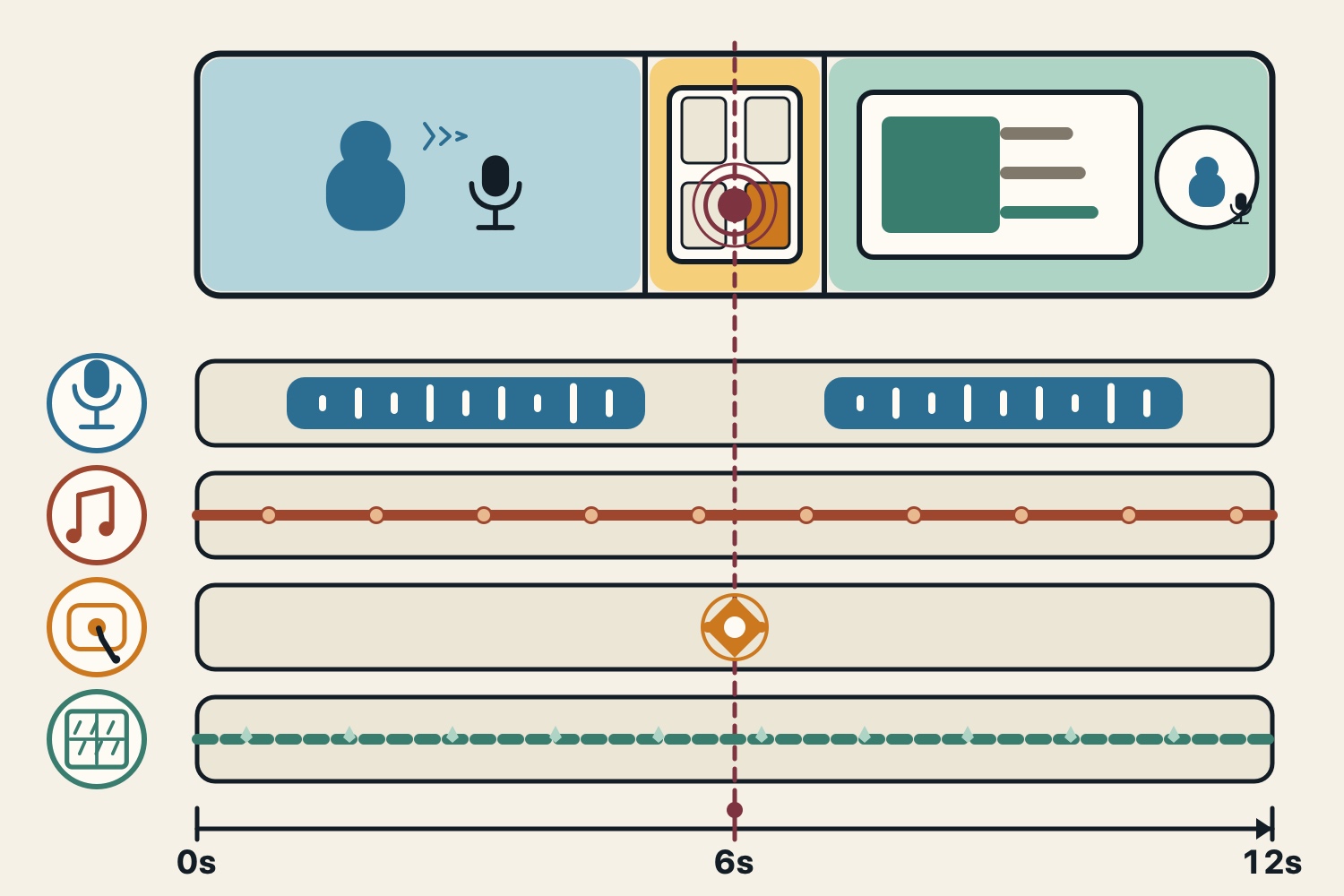
Imagine a rainy-day stream in which the presenter switches the shared screen while speaking. From seconds 1 to 5, they say, “Next, let's look at the settings screen.” At second 6, they select the screen to share, and a short confirmation sound accompanies the action. From seconds 7 to 11, they talk about the screen now displayed.
In the diagram, both the BGM and the rain outside the window continue from seconds 0 to 12. The place where the person is speaking and the mood of the stream stay the same after the screen changes. Putting only the sound that coincides exactly with the action at second 6 on its own row makes its role as a short cue easier to see beside the music and rain. The times in the diagram are one example of where each sound could be placed in a fictional scene.
When editing your own video, remove one sound at a time
To try this arrangement in your own video, keep the voice, music, interface sound, and rain on tracks that you can adjust separately. Leave the volume of your headphones or speakers unchanged and compare the same section. First, remove only the BGM. The voice, the cue for the action, and the rain remain. Then restore the BGM and remove only the screen-change sound effect that corresponds to second 6. The screen still changes, but the audio cue that announces it disappears.
Finally, restore the sound effect and remove only the rain. The stream continues with the same words and music, but the audio no longer conveys the weather outside the window. If you miss the ends of words when listening back to the voice, lower the music or rain slightly and listen to the same section again.
The Japan Foundation's Japanese-language teaching materials also provide the same sample conversation both with and without BGM. This is an example of separating a task focused on understanding the conversation from one that also uses music to grasp the mood of the scene.
Listen to the music, interface sound, and rain separately
The next three assets let you hear the sound roles from the diagram separately. The durations shown are those listed on the asset pages. “Small Talk” (2:08) is a track featuring electric piano and pads. If you place it behind speech, look for a level that still lets listeners follow the conversation.
“BUTTON 01” (0:02) is a click that can accompany pressing a button or confirming a choice. Matching it to the moment the screen changes makes it clear what caused the sound. On YouTube, playback starts at 23:34, just before the sound begins.
“Rain 1” (0:11) is the sound of rain striking a roof. You can try it as a background sound that conveys a place, as in the diagram. Listen to each asset separately to compare music, an action cue, and a sound that conveys the setting.
Check the terms for assets used in videos and streams
The three arcalune assets introduced here are royalty-free assets that allow commercial use and require no credit. The music and sound effects can be downloaded for free from their respective asset pages. Standalone redistribution or sale of the assets and use for AI training are prohibited. Check the asset page and usage guide for the latest terms before use.
Use the free BGM collection when you need music behind a scene, and the free sound effects collection when you need sounds for controls or weather. The streaming BGM guide explains how to choose tracks for waiting, chatting, and closing segments. The film music guide explains the roles of underscore and theme songs.
FAQ
- What does BGM stand for?
BGM stands for background music. It is music that plays behind a video, game, stream, or other content to support the mood and progression of a scene.
- Can you tell music and sound effects apart by their length?
Look at how the sound is used. A track that creates the background mood serves as BGM, while a short melody that signals a screen change or another event serves as a sound effect.
- Is the sound of rain a sound effect or ambient sound?
It can serve as ambient sound when it conveys continuous rain in a scene. On the site, rain sounds can be found in the free sound effects collection.
- Can I use the featured assets in monetized videos and streams?
The three assets in this article allow commercial use and require no credit. Standalone redistribution or sale and use for AI training are prohibited. Check the asset pages and usage guide for the current terms before use.