
What Is a Jingle? Background Music and Sound Effects Compared
In broadcasting, a jingle is a short piece of audio or music used when a programme begins or moves to another segment. On radio, a presenter may pause, a familiar short melody plays and a new topic begins. That sound tells the listener where one part of the programme ends and the next starts.
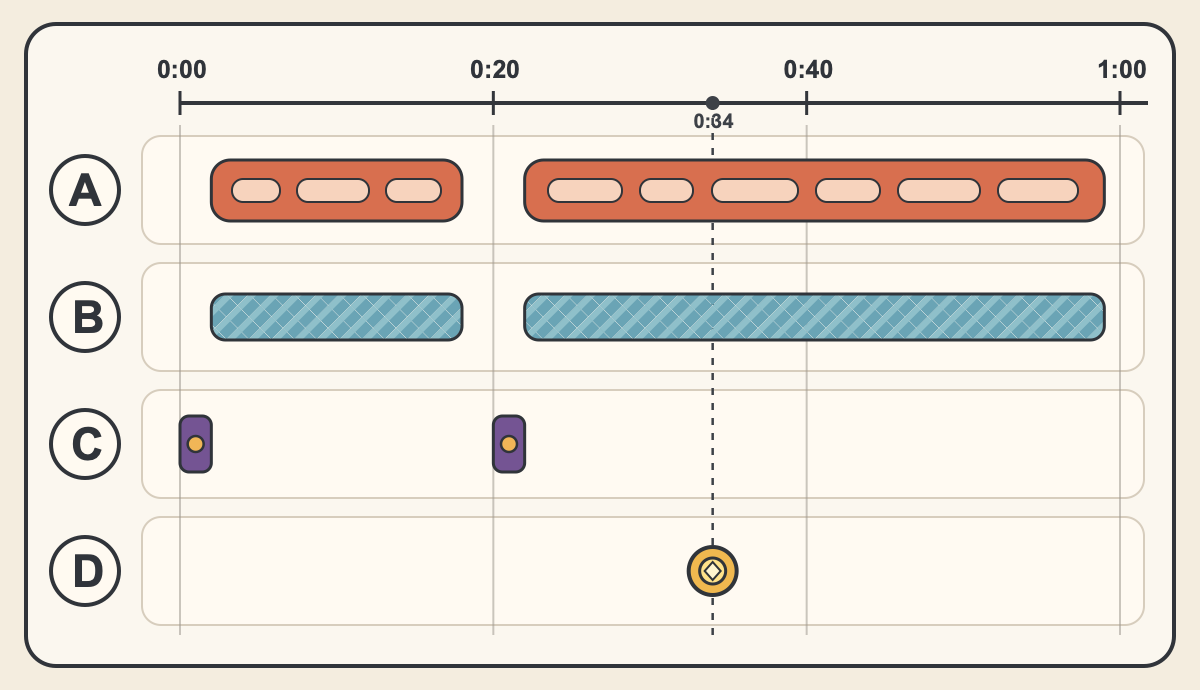
In video editing, a transition cue, background music and a sound effect that highlights an on-screen action belong in different places. The 60-second fictional programme below shows how their roles differ. The timings illustrate this particular edit.
In broadcasting it marks a programme, in advertising it can be a short song
A radio station may call the short audio or music played at the beginning or end of a programme, around commercials or between segments a jingle. Repeating the same sound at the opening can identify the programme, while using it partway through can signal a change of topic. The music may also carry a voice saying the programme or station name.
At a gathering marking 50 years since the launch of the local station BBC Radio Durham, jingles based on the folk songs “The Lambton Worm” and “Bobby Shaftoe” were played. They were produced by the BBC Radiophonic Workshop, which created sound for broadcasting. A person involved in the station’s programmes recalled the event in a BBC newsletter published in 2018.
In advertising, jingle also means a short song or tune intended to make a product memorable. In English, the word can also describe the light metallic sound of coins or keys touching. When searching for an asset, distinguish between a cue for a programme transition and the sound of metal objects.
Place the jingle, BGM and sound effect in different parts of a one-minute programme
Imagine a one-minute video explaining how to play a game. Play the same short jingle at 0:00 and again at 0:20, where the video moves from explanation to demonstration. The first use can announce the start of the programme, and the second can announce the next segment. In the diagram, the narration pauses for each cue and resumes after it ends.
BGM, short for background music, plays quietly under the narration inside each segment and stops at the break between topics. At 0:34 in the demonstration, add a sound effect at the instant a character collects a coin. Even while narration and BGM continue, the sound effect can point to that on-screen action.
The same fanfare can act as a transition cue when it plays every time a segment title appears, or as a sound effect when it is timed to an achievement. Do not classify a sound by length alone. First decide what the sound needs to communicate.
Compare the roles by listening to a fanfare and a coin sound
“Fanfare 1” is an approximately two-second trumpet phrase. Listen from 6:36 in the official sound-effects collection and consider whether the next line of narration can begin cleanly as the sound ends. It is a possible cue to place with a segment title.
“Coin Clink 1” is an approximately two-second sound of coins touching. Listen from 10:31 in the official sound-effects collection and imagine a character collecting a coin on screen. Editing priorities change depending on whether you repeat a cue to identify a segment or align one sound precisely with one action.
In the edit, check whether the cue finishes before the voice begins
If the jingle comes just before the next speaker starts, listen continuously from the end of the previous line through the first words of the next one. If the opening of the voice is obscured, move the cue earlier or choose another asset with a shorter tail. If the repeated sound makes the programme feel unsettled, limit it to the main segment boundaries instead of using it at every short interval.
The two sounds above are royalty-free assets available as free MP3 files and may be used in commercial videos and streams within the terms of use. Credit is optional. You may not redistribute the audio by itself or use it for AI training. Check the distributor’s terms before using any other asset as well. If you are entering a jingle contest, read both the asset terms and the contest rules, because some contests do not accept work made with stock audio.
Choose one point in your edit where the next topic begins. Place the cue you want to test just before it, then listen once from the end of the previous speech to the start of the next. This lets you check both whether the transition is clear and whether the dialogue remains easy to follow.
FAQ
- What is the difference between a jingle and BGM?
A jingle is a short cue that marks the start of a programme or a change of segment. BGM is background music played under speech or visuals. In an edit, choose between them by asking whether the sound should announce a transition or support the scene in the background.
- Does a jingle have a fixed length?
Its length depends on its purpose. For a cue between segments, choose an asset that fits between the end of one passage of speech and the start of the next, and first try it where it does not overlap the voice.
- Can an ordinary sound effect be used as a jingle?
A short fanfare can serve as a transition cue if you place it at the same segment change each time. Check the selected audio’s terms before using it in a video or stream.