
Free Podcast Background Music | Four Tracks for Intros, Speech, Transitions and Outros
Choose podcast music for four moments in the episode. Try it when you name the show, underneath speech, at a change of topic and at the end. Listen to the voice by itself first to check that the show name and the next topic come through on the first listen. Then decide where music helps.
Follow a one-minute book podcast and see where each kind of music fits. You can hear four free, royalty-free tracks from the start of each track on our official YouTube channel. Commercial use is allowed under our usage terms.
Plan a one-minute audio episode
For a short book podcast, open with the show name and the title of the book. Tell listeners about a scene that caught your attention and explain why. Then ask the audience a question and end with a line about the next episode.
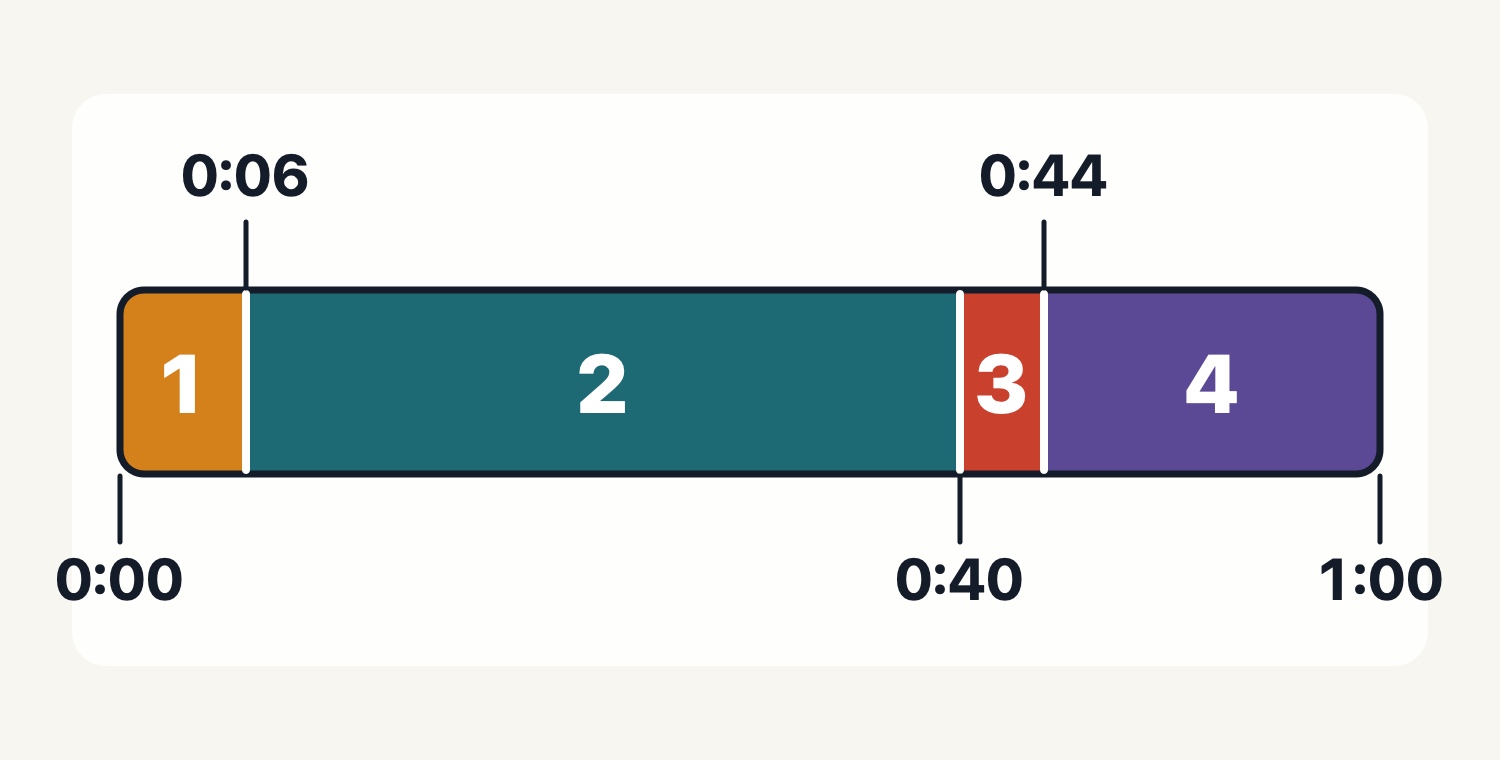
The diagram shows where the voice takes on a new job. Listen to your recording to decide where to try music. Check the episode timing and the full length of the track separately.
| Episode time | What the voice says | Where to try music |
|---|---|---|
| 0:00–0:06 | Show name and book title | Before and after the first words |
| 0:06–0:40 | A memorable scene and why it stands out | From the first word of a sentence to the last |
| 0:40–0:44 | A question for the audience | From the end of one sentence to the start of the next |
| 0:44–1:00 | Next topic and goodbye | At the start of the preview and after the final words |
Keep the show name clear in the opening
Compare an episode that opens with the show name and one that starts with a greeting. If the start of the music makes the name hard to hear, try placing the music before the first words or after the host starts speaking.
Try the ambient track “Departure Signal” for a quiet opening. The downloadable file lasts 27.320 seconds. If you have six seconds for the introduction, find a place where the full track fits or pick a cue that fits the time you have.
Compare voice alone and two tracks against the same sentence
Take the same ten seconds of speech featuring a book title or a number and make three copies. Keep the voice at the same point and level in all three. Keep the first version voice-only. For the other two, check the permitted use of each track and try its first ten seconds underneath the same voice clip.
Play all three at the same device volume. See whether you catch the title and number on the first listen and can follow the sentence to its end. For track A, try “Small Talk,” a 2:08 piece with electric piano and pads. For track B, choose another candidate from the narration collection. If you find yourself replaying a line to understand it, try a different track or leave that line voice-only.
Listen through the first words after a transition
When the topic changes, listen from the last words of one section through the first words of the next. If you want to give listeners time to consider a question, try a pause without music as well.
“Quick Note” is one option for a transition. Its listing rounds to about 24 seconds, and the downloadable file lasts 23.520 seconds. Playing it in full during the four-second slot in the diagram changes when the next section starts. Make room for the whole cue or choose a different one.
Make room for the next-episode preview
When you mention the next topic or give contact details, check that listeners can hear the line all the way through. Try music under that announcement, then try placing it after the last words.
“See You Tomorrow” is a closing option with electric piano and bells. It lasts 2:59. Listen from the final greeting through the end of the episode to check how much space the spoken preview has.
Check the music license and the platform's publishing rules
All four tracks are free to download and royalty-free. Under our usage terms, extra fees do not accrue with each use or play. The tracks can be used in commercial and non-commercial podcasts with no credit required. Selling or redistributing the audio on its own and using it for AI training are prohibited.
Check the current terms and the distributor's guidance before using an excerpt, fading the music or repeating it in a loop. With other sources, check permission for audio episodes, commercial episodes and any attribution requirements. Also check the publishing rules of each platform you plan to use.
- 1
Introduce the show
This quiet ambient track runs about 27 seconds. Use the same greeting to compare starting the music before the voice or once the host begins.
Use it forOpening, Show name
These sounds from arcalune
- Departure Signal0:27
- 2
Under the conversation
Electric piano and pads play across 2:08. Compare your voice alone with the music underneath, then check that you hear the book title and the final words of the sentence.
Use it forConversation, Podcast
These sounds from arcalune
- Small Talk2:08
- 3
Change topic
The whole cue runs about 24 seconds. If you use it in full, check how much room you have between the end of one section and the first words of the next.
Use it forTransition, Short cue
These sounds from arcalune
- Quick Note0:24
- 4
Close and preview the next episode
This 2:59 track uses electric piano and bells. Try it alongside the closing line or the next-episode preview and check where the speech finishes.
Use it forNext episode, Outro
These sounds from arcalune
- See You Tomorrow2:59
Open any track card to check the full duration and download format. Once you have a candidate, use the line your listeners most need to hear for the comparison.
FAQ
- Can I use these tracks in a commercial podcast for free?
Yes. The four tracks are free to download and royalty-free. Our usage terms allow commercial podcast use with no credit required. Check the publishing rules of your platform as well.
- Should music play throughout a conversation?
Compare the same line with voice alone and with two candidate tracks. Check that you catch names and numbers on the first listen. Mark any lines you prefer to leave voice-only.
- Can I download the four- and six-second tracks in the diagram?
Those are timing slots in the example episode. Check the full duration on the track cards and choose a place where the cue fits if you use it in full. The short candidates run about 24 and 27 seconds. Check the distributor's latest terms and guidance before using excerpts, fades or loops.