
4 Free Tracks for Wedding Slideshows | Music and Photo Timing
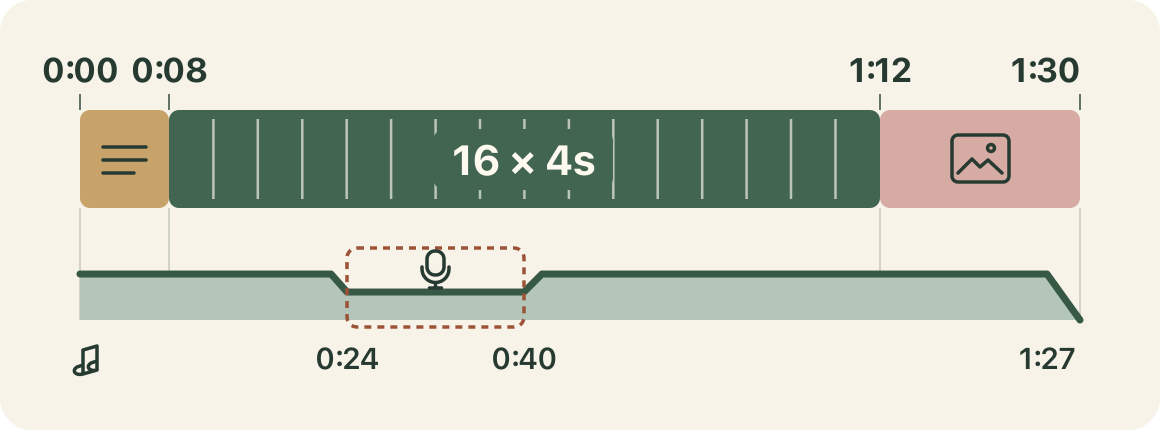
When making a wedding profile video, first decide how long to show your names, how long to let guests view the photos, and how long to leave for your thank-you message. This short 90-second example shows one way to arrange the photos and place the BGM.
The four candidates are available as free downloads. Choose from an acoustic track, a 6/8 piece led by violin, a flute waltz, and jazz to suit the mood and length of your photos.
How this list was chosen
- We used each track's published description and duration to decide whether it would be easier to try during the opening with the couple's names, the photo sequence, or the thank-you message.
- The YouTube links in the article open each track's official chapter. The diagram below shows times measured from the beginning of the video you are making.
Fit 16 photos into 90 seconds
Use the first 8 seconds for the title and the couple's names. Place 16 photos in the following 64 seconds, which gives each photo 4 seconds. Arrange childhood photos first, then photos from after the couple met, followed by recent photos of them together. For the final 18 seconds, keep the 16th photo on screen and place the thank-you message over it.
If one photo has a longer caption, keep it on screen for longer and shorten a photo with no comment to compensate. First watch the sequence with only the photos and text, then fix any cut that comes before a name or date can be read.
Leave enough time to read the names in the first 8 seconds
Try placing the acoustic track under the first photo and the couple's names. If the title contains a lot of text, holding one screen for longer is easier to read than adding more photo changes.
You can first try carrying the 3-minute 30-second candidate from the opening to the end. Start the video at the beginning of the track, then slowly lower the volume at the end of the video.
Compare violin and flute in the middle photo sequence
For photos that move from a period spent far apart to a reunion, try the 6/8 track led by violin. A flute-led waltz is another candidate for photos of the couple's everyday life. Place both tracks under the same four photos in turn and compare which one better fits the expressions and short captions.
If the video includes narration, lower the BGM just before the first word, as shown from 0:24 to 0:40 in the example. Slowly bring it back after the voice ends, then check separately whether the narration is clear and whether there is enough time to read the on-screen text.
Keep the thank-you message on screen for the final 18 seconds
When the photo sequence ends at 1:12, keep the 16th photo on screen and place the thank-you message over it. If you change tracks, a point where the screen takes on a new role like this is one option. For a calm closing, you can also try the jazz track inspired by the moment before a gift is opened.
Changing the track only for the ending can make the switch stand out in such a short span. If the thank-you message is the focus, also try keeping the previous track and lowering its volume from 1:27.
Check these points before downloading and submitting the video to the venue
The four tracks listed below can be downloaded free from their individual pages. Under the usage guide, downloadable BGM on this site is royalty-free material that may be used in commercial and non-commercial videos without credit. Reselling or redistributing the audio by itself and using it for AI training are prohibited.
If the video will be shown at a venue, ask about the required file format, how the volume will be checked, and whether you need to identify the source of the music. If you record commercially released music into a wedding profile video in Japan, check the JASRAC and ISUM bridal guidance and discuss the procedure with the venue or video production company.
- 1
Opening with the couple's names
An acoustic track depicting two people walking side by side on a beach. At 3 minutes 30 seconds, it can also be tried as the single track carrying a short video from beginning to end.
Use it forTitle, From the opening
These sounds from arcalune
- 2
Photos that tell a reunion story
A 6/8 track led by violin. Place it under photos that move from a period spent apart to a reunion, then compare the picture changes with the flow of the melody.
Use it forPhoto sequence, Violin
These sounds from arcalune
- You Came Back2:52
- 3
Photos of everyday life together
A waltz led by flute. Use the same photos in the middle section to compare its impression with the violin track.
Use it forPhoto sequence, Flute
These sounds from arcalune
- 4
Closing with a message
A jazz track depicting the moment before a gift is opened. Try it after the photo sequence, while keeping the final photo and thank-you message on screen.
Use it forThank-you message, Closing
These sounds from arcalune
Start by making a short draft with only four photos and try the acoustic, violin, and flute candidates under the same footage. When the video is complete, play the file you will submit to the venue from the beginning and check that the text can be read, the narration can be heard, and the video plays through to the end.
FAQ
- How many photos can fit in a 90-second wedding profile video?
With an 8-second opening and an 18-second closing, the middle section lasts 64 seconds. Showing each photo for 4 seconds fits 16 photos, and the 16th photo can remain on screen for the closing. Keep photos with more text on screen for longer and adjust the others.
- Can I make a wedding profile video with only one BGM track?
You can use the same track from the opening to the end, lower its volume during narration, and fade it out at the end. If you change tracks, try the point where the photo sequence moves into the thank-you message so the difference is easier to compare.
- Can I download and use the featured tracks?
The four featured tracks are royalty-free BGM that can be downloaded free from their individual pages. Under the usage guide, they may be used in commercial and non-commercial videos without credit. If the video will be shown at a venue, also check the venue's submission requirements.