
Free Piano BGM for Videos: Dialogue, Movement and Endings
Choose piano music by what the scene needs. Try passages with fewer notes under speech, use beats or phrases to connect movements and listen for how long the sound lasts under the final shot. Play each candidate against the same footage to compare what it brings out.
A short clip of tending a plant by the window gives us three moments to test: a spoken instruction, the movement of pouring water and the last shot at dusk. Each has a free piano track you can download and try.
Check the download and usage terms
Open a track from the piano catalog and check its download availability and full length on the track page. Import your candidates into your editor so you can compare them from the same point in the scene.
The three tracks on this page are royalty-free and free to download. The usage guide permits commercial and non-commercial videos and streams with no credit requirement. Standalone redistribution or sale of the audio and use for AI training are prohibited. For music from another source, check the terms of that track.
Solo piano and arrangements with other instruments
A solo piano piece uses piano alone. In an ensemble, instruments such as strings may play alongside it. A busy piano solo can still make speech difficult to hear. Check the instrumentation, then listen to how many sounds overlap in the part you want to use.
All three tracks here are piano-led ensembles. Wiping the Fogged Pane adds celesta, Violas and Cyclamen adds celesta and harp, and Lamps at Sunset adds harp and cello.
Three tests with the same footage
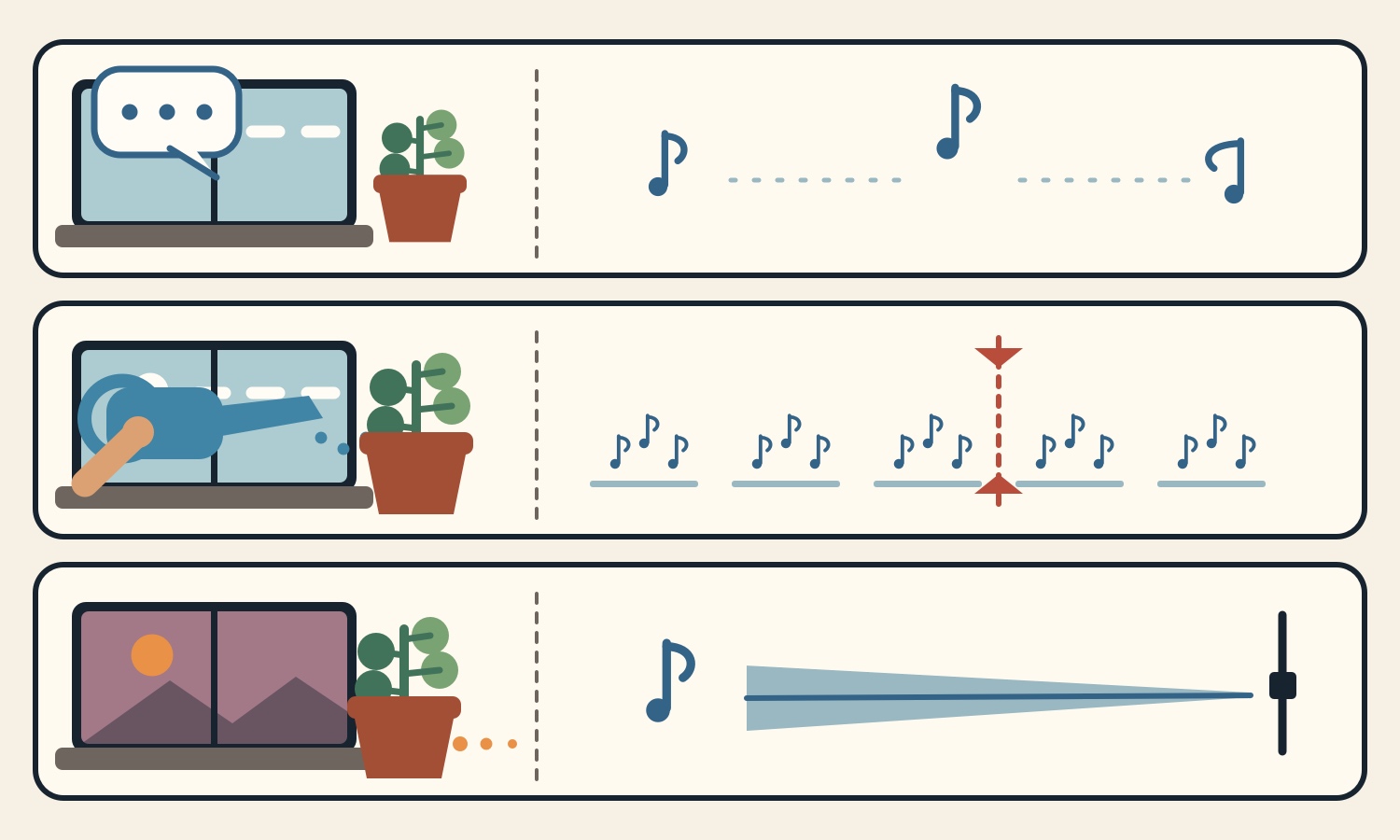
First comes the line, “Put pebbles at the bottom of the pot.” Play the same voiceover under a busier piano passage and under one with gaps between notes. Check whether you can catch “bottom” and “pebbles” on the first listen.
Next, someone lifts a watering can and pours. Mark when the water starts to flow and when the can is put down. Try lining up one of these events with a beat before adjusting the other cut.
Finally, the plant is placed by the window at dusk. Hold the picture ending at the same point and compare an edit that ends the music there with one that lets it linger. The illustration shows what to listen for in each scene.
For speech, try Wiping the Fogged Pane
Wiping the Fogged Pane (3:45) combines a spaced-out felt piano melody with celesta. Start at 7:36 on YouTube and look for a passage to try under the voice naming the materials.
Make a version that lowers the music only while someone speaks. Then check the words on a phone speaker. Lowering background audio when the voice comes in is called ducking. Adjust the amount to suit the particular voice and track.
For movement, try Violas and Cyclamen
Violas and Cyclamen (3:44) is a waltz in triple time with felt piano, celesta and harp. Start at 11:24 on YouTube and try aligning the first flow of water with the start of a musical phrase.
Compare an edit that aligns the start of the pour with one that also aligns the cut where the watering can is put down. If the action looks rushed, try shifting the music before changing the speed of the footage.
For the final shot, try Lamps at Sunset
Lamps at Sunset (3:45) pairs felt piano and harp with cello. Start at 41:47 on YouTube and choose a passage for the final shot of the plant by the window.
Try ending the picture and sound together at a musical break, then compare with a fade-out into the end of the shot. A fade-out gradually lowers the sound over a chosen interval. Decide how long to show the plant and find a stopping point that feels natural against the picture.
Compare at the same playback level
Keep the footage, narration and device volume the same. Check whether you can hear the materials being named, whether the pour looks natural and whether the music and picture end together in the way you want.
The three tracks are part of a 56:55 video with 15 tracks. Browse the chapters on the collection page. To get a file for editing, open the page for the track you choose.
- 1
Three piano tracks to try in a video
Listen to a candidate for speech, one for movement and one for the final shot.
These sounds from arcalune
FAQ
- How do I choose between solo piano and an ensemble?
Solo piano uses piano alone, while an ensemble adds other instruments. Compare speech clarity, the way the music fits the motion and how the sound ends under the same footage. All three featured tracks are piano-led ensembles.
- How loud should piano BGM be under narration?
Lower the music gradually under the voice until you can catch the ingredients and numbers on the first listen. Adjust the balance for each pairing of voice and music.
- Which part of pouring water should I align to the beat?
Pick a visible movement, such as when the water first comes out. Align that point to a beat or a change in the phrase. If the action looks rushed, try shifting the start of the music.
- Should I use a fade-out at the end of a video?
Try ending at a break in the music, and compare it with lowering the music under the final shot. Pick where the picture ends first, then choose where the sound can die out naturally.
- Can I use the three tracks in a commercial video?
Yes. The tracks are free to download and royalty-free. The usage guide allows commercial use without credit. Standalone redistribution or sale and AI training are prohibited.