
Free BGM for Short Videos: A 15-Second Edit and Usage Guide
Choose music for a short video after deciding when people should hear the voice, watch the action or notice the reveal. Playing the track against the footage exposes places where music masks words or gives you a cue for a cut.
A 15-second drink video shows where to lower the music, pause it and bring it back. Try three tracks you can download for free and check the commercial-use and credit terms for each source.
Choose music for the voice, the cuts or the punchline
For a voice-led video, cut the narration first. In a recipe, try the music under the ingredients and quantities and check whether you can catch every number on the first listen. Lower the music where it masks the voice, or pick a sparser part of the track.
In a montage without speech, try placing the major visual cuts on a beat or a change in the musical phrase. Start with three points: the first action, the highlight and the final shot.
When a video builds to a punchline or a reveal, make one edit where the music continues and one where it stops just before the moment. Let the line or location sound come forward. Bring the music back afterwards if it fits.
Map the sound in a 15-second edit
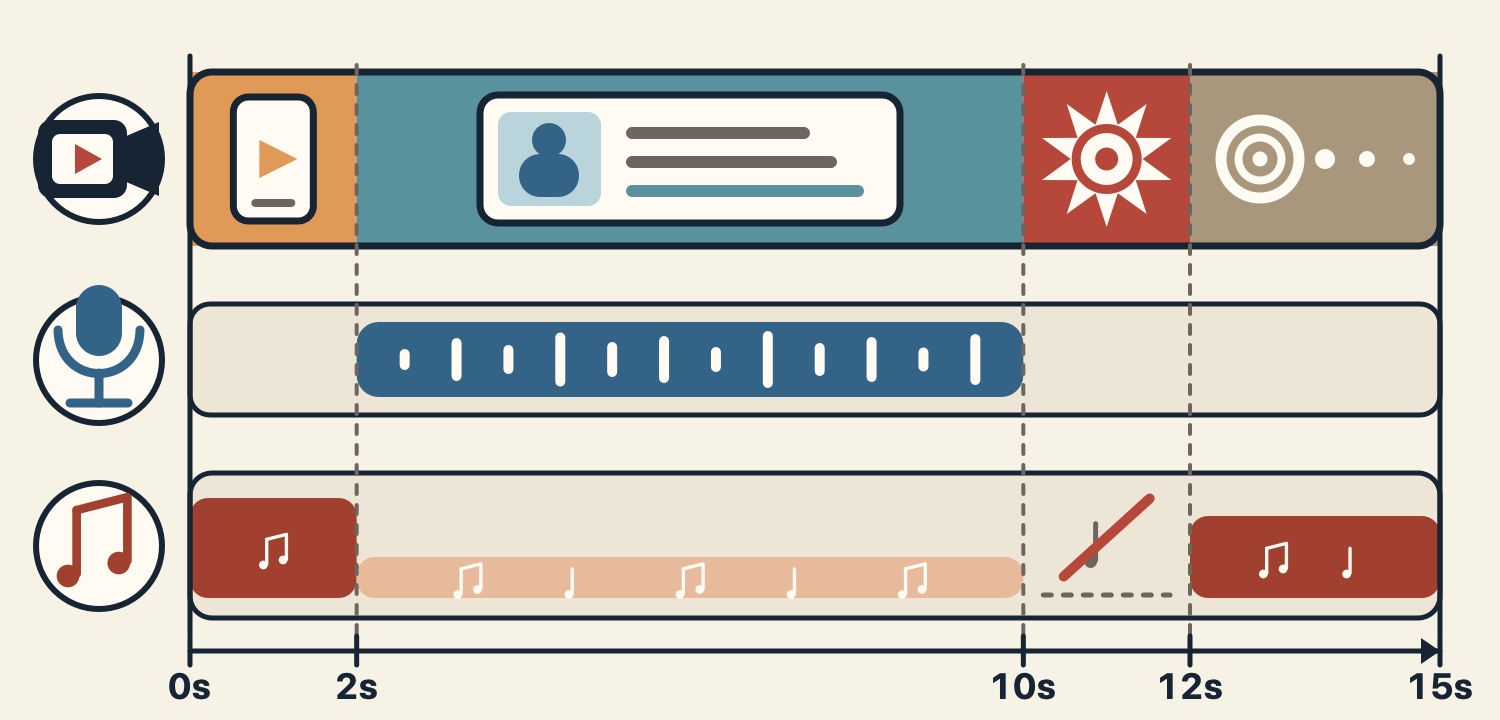
Imagine a hands-only video making a sparkling orange drink. Show the glass and ingredients from 0 to 2 seconds. Explain the steps in a brief voiceover from 2 to 10. Pour in the sparkling water for the reveal from 10 to 12, then hold on the finished glass until 15.
The rows show picture, voice and music. Start the music with the opening and lower it under the voice from 2 to 10 seconds. Pause it from 10 to 12 so the fizz comes through. Bring it back for the last shot and end it with the picture. The height of the music band represents relative level.
Check that the sound you want to feature is audible with the music off. To hold the reveal longer, shorten the explanation and try shifting the transition from speech to the result.
Three ways to add music to a YouTube Short
To add music in the YouTube app, choose a track through Add sound in the Shorts creator. Check the available duration for the track you choose. YouTube describes this library as for personal, non-commercial use unless you have the appropriate licenses.
In the YouTube Studio Audio Library, preview the track, check its license and download the MP3. For Creative Commons tracks, paste the specified credit in the description. You can filter for tracks under the standard library license that require no attribution.
For tracks from a download site, read the terms on the source page and import the downloaded file into your video editor. For an ad, a company post or a cross-post, confirm that the source permits each intended use.
Check commercial use and Content ID
Save the title, the source, the terms page and the date you checked it before publishing. Check commercial use, attribution, ads and any other platforms you plan to post to.
The three tracks here are royalty-free and free to download. The usage guide permits commercial and non-commercial videos and streams with no credit requirement. Standalone redistribution or sale of the audio and use for AI training are prohibited.
A Short longer than one minute with an active Content ID claim is blocked worldwide on YouTube and is ineligible for monetization. If you receive a claim, check the section identified in the notice against the terms for the audio you used.
Try the opening of three tracks against your footage
Place the track openings under the same footage and compare speech clarity, the pace of the cuts and what happens around the reveal. Each YouTube link opens at the start of that track in the video. The track pages give the full duration.
White Breath (2:28) is a gentle piano track. Try it under a recipe or tutorial, and listen for whether the piano distracts while someone names an ingredient.
Days of Youth (2:05) has a lively guitar part. Try lining up the first and last cuts of a montage of hands or movement with changes in the music.
The Big Chase (2:37) is upbeat and suited to a chase. Try it under a rush of movement, then cut the music just before the outcome.
Check the finished mix on a phone speaker
Play the exported video on a phone speaker. Jump into the middle of the narration and see whether you can make out the words. A peak meter shows momentary signal levels. Listen for speech clarity when voice and music overlap.
Play through the opening, the voiceover, the music break and the ending in one pass. Check that you can hear the reveal and that the music does not jump in volume when it returns or ends. The AI video guide also shows how to choose transition and impact sounds.
References
- 1
Three tracks to try in short videos
Hear one candidate for narration, one for a montage and one for a punchline.
These sounds from arcalune
- White Breath2:28
- Days of Youth2:05
- The Big Chase2:37
FAQ
- Should I choose a short track for a Short?
A section of a longer track can work if it fits the scene. Within the license terms, try picking a start and end that work with your edit.
- What percentage should I set my music to under narration?
Set the level relative to the recorded voice and the track. Listen to the voice alone, then raise the music gradually until both are audible and words and numbers remain clear on a phone speaker.
- How do I add audio to YouTube Shorts?
In the app, choose a track through the Shorts sound picker. For audio from Studio's Audio Library or a download site, check the terms and then add the file to your video in an editor.
- What happens when a Short over one minute has a Content ID claim?
An active claim means the Short is blocked worldwide and ineligible for monetization. Check the section in the notice and the terms for the audio you used.
- Can I use the three featured tracks in a commercial video?
Yes. All three are royalty-free and free to download. Commercial use is allowed within the usage guide with no credit required. Standalone redistribution or sale and AI training are prohibited.