

How to time sound effects for a results announcement
A drum roll can build anticipation, a hit can mark the moment the result appears, and a fanfare can celebrate it afterward. Pick the moment you want to highlight and time the sound to the host’s words and the reveal on screen.
Follow a 12-second ranking announcement with a host and on-screen captions. Each YouTube link opens the point where that sound starts in the collection.
Build a 12-second ranking announcement
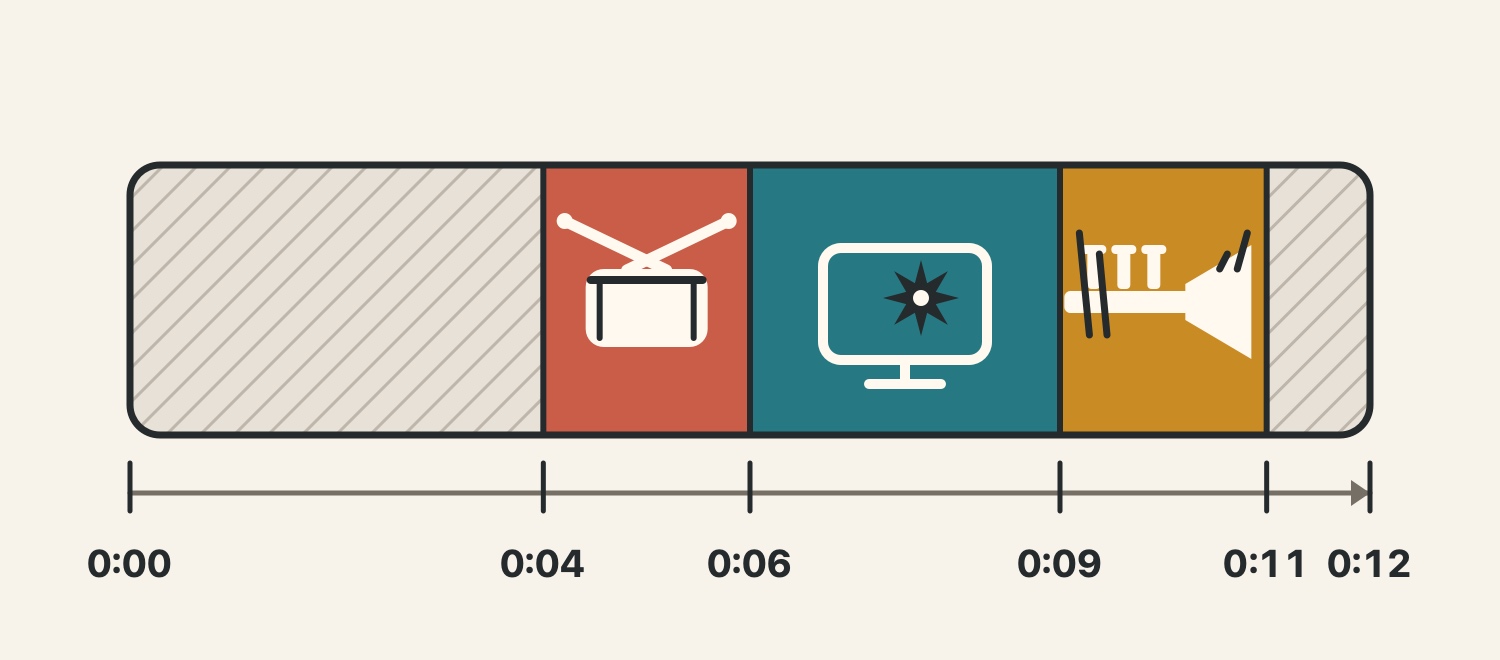
At 0:00, the host says, “It’s time to announce first place.” Add a two-second drum roll at 0:04. Reveal the rank and winner’s name at 0:06 with a three-second hit, then start a two-second fanfare at 0:09. Leave the result on screen for the final second.
Mark where the host says the winner’s name and the frame where the caption appears before you place the effects. The diagram uses 0:06 for that cue. Adjust the surrounding intervals to fit your footage and dialogue.
Keep the host’s voice clear
Play the same 12 seconds with dialogue and background music. Listen once with the effects, then again with them muted. Check whether you can make out the winner’s name and rank. Turn down any effect that covers the words.
If the words are still hard to hear, move the effect to just after the line. For an effect that needs to start with a visual cue, keep it in place and lower the music during that interval. If the edit feels crowded, choose the one cue you want to emphasize.
Start the drum roll two seconds before the reveal
Place “Drum Roll 1” in the pause between “In first place…” and the winner’s name. In the diagram, it runs from 0:04 to 0:06. Use the point where the host begins saying the name to find the right gap in your edit.
Align the hit with the frame that shows the result
At 0:06, start the three-second “Orchestra Hit 1” on the frame where the ranking caption appears. If the host says the name on that beat, vary the effect’s level while previewing the caption and voice together. Find a level where the visual and sound stay in sync and the name remains clear.
Play the fanfare and leave time to read the result
Start the two-second “Fanfare 1” at 0:09 to celebrate the result. The sound ends at 0:11 and the ranking stays on screen until 0:12. If the card shows several names or scores, hold it longer so viewers have time to read it.
Choose one sound for a short announcement
Try a drum roll if you want to emphasize the pause, a hit if the reveal is the key moment, or a fanfare to celebrate afterward. If the host speaks throughout, try a short effect in a break between words.
When comparing other fanfare takes, preview them against the same footage and check whether each one ends before the next line.
What royalty-free use covers
The three effects are free to download and royalty-free. The license allows commercial videos and streams, with no per-use fees or credit requirement.
Standalone redistribution and use for AI training are prohibited. Check for the download option on the track page and read the usage guide before editing.
References
- 1
Sound effects for the three moments
Try the anticipation, reveal and celebration cues in editing order.
These sounds from arcalune
- Drum Roll 10:02
- Orchestra Hit 10:03
- Fanfare 10:02
Try the sounds in editing order over the same footage. Keep the host’s voice on while you choose where to place each effect.
FAQ
- Which sound effects work before, during and after a reveal?
Try a drum roll before the reveal, a hit when the rank or winner appears, and a fanfare after the result. Place the host’s words and captions first, then add sounds at the moments you want to emphasize.
- How many sound effects does a short announcement need?
Start with one sound at the moment you want to emphasize. If the reveal is the focus, align a hit with the frame where the title or ranking appears.
- How can I keep the effect from covering the host’s voice?
Turn the effect down first. If the words are still hard to hear, move it after the line and compare. If the sound needs to match the reveal, lower the background music during that interval too.
- Can I use the three sound effects commercially for free?
Yes. The three effects are free and royalty-free for commercial use, with no credit required. The usage guide prohibits standalone redistribution and AI training.